August
31
Posted on 31-08-2009
Filed Under (Arduino) by Dan

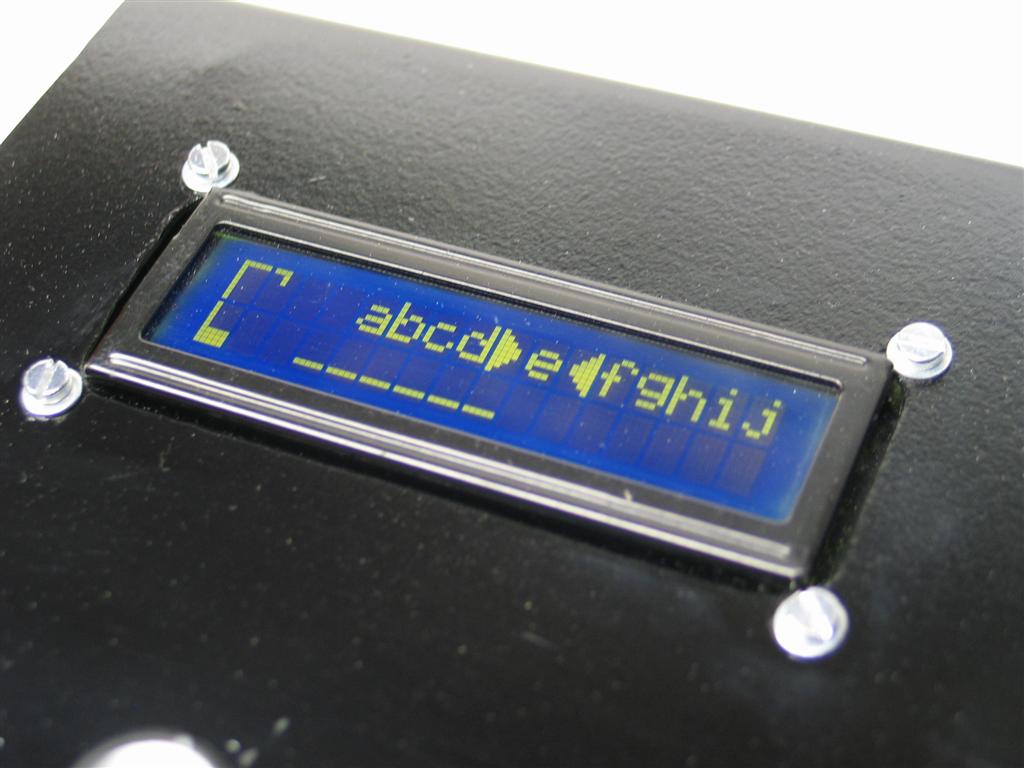
Hangmanduino is complete! A word is selected at random from a list of 10 words. This could be set higher, but for demonstration purposes, it’s 10. The user scrolls through the alphabet to select a letter using the potentiometer on the front of the case. To select a letter, the user pushes down on the potentiometer. Schematics, pictures of the build and demo video can be found below…click here to download the source code, but keep in mind you will need to download the string library as well to compile this code.

(13) Comments    Read More   

Comments

chicosoft on 1 September, 2009 at 12:39 pm #

With this cool project you have conviced me that i have to start in the world of arduino. How did you compile te code for arduino? Thanks


Dan on 1 September, 2009 at 2:13 pm #

Hey chicosoft, that’s great to hear. Arduino is a great platform, especially if you’re new to the AVR/microprocessor environment like me.

To compile code, just go to http://www.arduino.cc and download the latest IDE (currently version 0017) for the OS that you’re running. Have fun!


Josiah Ritchie on 1 September, 2009 at 2:27 pm #

I like it, but am most interested in the case. It looks pretty sharp in the video. I was thinking about putting a case like that together and would enjoy hearing what you learned in assembling yours.


Dan on 1 September, 2009 at 2:45 pm #

Sure thing Josiah. The metal part of the case comes from the side of a computer case. I just measured everything out on paper and made sure that it would be big enough to fit my Arduino and make-shift shield and made the cut. I put the bends in the metal with some clamps and some scrap 1×1 pieces. I’ll reference the Make Magazine article on making a chair from a grocery cart…something similar to that. The rest was careful measuring and planning and grinding down the edges. The finish is 2 coats of regular old Rustoleum black with a clear coat. The bottom is made out of some scrap plywood painted black, the sides are some AC grade plywood I had which I stained.

I make guitar effects pedals too, so I have some plans rolling around in my head to make a similar case completely out of metal. It would only be 2 pieces bend and held together with some screws on the top and back. Perhaps someday I’ll play with that and draw/share the plans with everyone. For now, I’d be willing to share the measurements with you if that’s something you’d be interested in.


chicosoft on 1 September, 2009 at 5:48 pm #

Hello, thanks for your reply, i was looking to the prog, i am really new to this.
how do i compile with the librarys? put the in some folder?
i will try to make one, tomorrow i will buy my first arduino, what do you think about: “Arduino Duemilanove with Atmega328″ it comes preburned with a bootloader, i think that is a good choice rigth?


Dan on 2 September, 2009 at 1:46 pm #

Chicosoft, indeed all you need to do to make use of a library is put the files in the “yourarduinoroot\hardware\libraries” folder. Then close the IDE and re-open and you should be able to use it.

Duemilanove w/ATMEGA328 is fine, and probably the most common Arduino board available. However, there are tons of options…http://www.freeduino.org/ is a good site that lists all the different boards and reditions, along with some other Arduino projects/references.

Good luck on your endeavors!


Sid Guglielmino on 2 September, 2009 at 7:28 pm #

This is a fantastic effort. Well done!

I’ve been fiddling with Arduino and an LCD for a while but didn’t think you could push it this far. Excellent job, and thanks for sharing the code. I’m sure I’ll learn a lot from it.


chicosoft on 3 September, 2009 at 5:04 am #

Hello, thanks for you answers, you help a noobie in this area. Today i will receive my first arduino, i will start to try doing the basics that are in the program, and then i will go to your project.
Can you explain that 10K resistance in the contrast and Control? Is that a push button with a 10K resistance?

Thanks for all


Sid Guglielmino on 3 September, 2009 at 7:19 pm #

Dan

Just tried building one of these. Had all the bits so the whole process only took about 15 minutes and your code worked first time once I changed your “LiquidCrystal lcd(12, 11, 2, 7, 8, 9, 10);” to suit my display “(12, 11, 5, 4, 3, 2);”. Thanks again.


Dan on 8 September, 2009 at 9:50 pm #

Sid, great to hear! I’m glad you had a good time and perhaps even learned a trick or two from the code. God knows I was banging my head for quite a few nights and I’m glad to see my efforts go to good use.


Dan on 8 September, 2009 at 9:54 pm #

chicosoft, the 10K “resistance” symbols in the schematic are potentiometers. The contrast pot controls the contrast of the LCD and the control moves the selections in the game.


Marcos on 10 November, 2009 at 2:49 am #

This is very cool too! You are very creative!!!!
Man, now you got a number one fan in Brazil!


Dan on 10 November, 2009 at 1:40 pm #

HAHA! Awesome! Thanks Marcos!


Post a Comment
Name:
Email:
Website:
Comments:
Prove you are human by reading this resistor:
0Ω+/- 5%

0
0
1
2
3
4
5
6
7
8
9

0
0
1
2
3
4
5
6
7
8
9

0
0
1
2
3
4
5
6
7
8
9

5
5
10
20

Match the sliders on the left to each color band on the resistor.

Click Here for a new resistor image.

If you'd like to learn more, read about resistor color codes here.